
Over the past weeks, I’ve found myself doing quite a bit of WordPress development again. Proper hands-on work – PHP, MySQL, the occasional CSS battle (although thankfully less of that these days). And like probably everyone else in the field right now, I’ve been working heavily with AI alongside it.
Overall, it works. Really well, actually. But not perfectly. And that gap between “really good” and “reliable” is where things get interesting.
In most cases, ChatGPT gives me exactly what I need. Clean code, good structure, often even anticipating things I hadn’t explicitly asked for.
But every now and then, it produces something that looks perfectly fine at first glance and still contains a subtle issue.
Not something that blows up immediately, but something that sits there quietly and only shows itself later.
One example from last week: I had a SQL query generated to pull data across several WordPress tables. The query looked great – readable, structured, everything in place. It even ran without errors. The only problem was that one join condition wasn’t quite right. The result set was “almost correct”, which is probably the most dangerous type of wrong. Nothing crashes, nothing screams, but your data is off just enough to cause trouble down the line.
Another one was a PHP snippet dealing with user input in a custom WordPress function. Again, it looked solid. Proper structure, even comments explaining what’s going on. But one sanitisation step was missing in a specific edge case. Not catastrophic, but definitely not something I’d want to ship without noticing.
These are the kinds of things you start to recognise after a while. The AI isn’t careless – it’s just not accountable. That part still sits with you.
At some point, I changed one small thing in how I work: I stopped trusting a single output and started letting different AIs look at each other’s work. Nothing fancy, no big system behind it. I simply take the output from one model and ask another one to review it critically. Sometimes I even throw a third one into the mix.
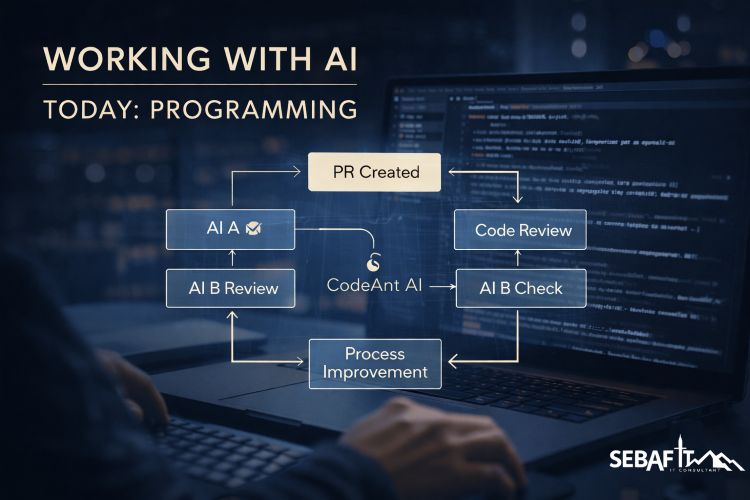
Since doing that, my results improved noticeably.
I’d say I’m now somewhere around a 99% correctness rate, and my throughput has gone up by maybe 50%.
Not because I got faster, but because I spend less time chasing down those subtle, annoying issues.
It turns out that AI is quite good at pointing out the weaknesses of… other AI.
The more I work like this, the clearer it becomes that it’s not just about using AI, but about understanding how to use different models for different purposes. Some are great at generating code, others are much better at reviewing, questioning, or spotting inconsistencies. If you treat them all the same, you get average results. If you start to combine them deliberately, things get a lot more interesting.
Around the same time, I also started running my own models locally. That was a bit of a rabbit hole. I’m using LM Studio for that, which is basically a very convenient way to run large language models on your own machine. No cloud, no API, just you and the model.
And yes… this is also where my long-standing “I need 64GB RAM for video editing” story starts to fall apart a bit. Technically, that was always true. But let’s be honest – video editing is more of a hobby for me. Professionally, I could have lived with less RAM for quite a while.
Now, however, I’m running models like Qwen 3.5 with 35 billion parameters locally, and suddenly 64GB doesn’t feel excessive anymore.
It’s not that I’m running out constantly, but it’s the first time where I can say: alright, this machine is actually being used for what it’s capable of. Let’s just say my hardware decisions aged better than expected.

For those who haven’t looked into it yet: LM Studio makes it surprisingly easy to run these models locally, and Qwen is one of the more capable model families out there right now, especially when it comes to coding and reasoning tasks. Running things locally gives you a different level of control and independence, but it also reminds you very quickly that these models are not lightweight toys.
What really stands out to me, though, is not just the speed gain. It’s the combination of speed and quality. What I built last week – on my own, but with AI as a constant companion – would have taken me three weeks two years ago. And even then, it wouldn’t have been as clean, as structured, or as robust as what I ended up with now. There are more features in it, more edge cases covered, and overall it just feels… safer.
And yes, I also spend a lot less time fighting CSS these days, which alone is probably worth the whole exercise.
If there’s one takeaway from all of this, it’s that AI doesn’t replace the work. It changes how you approach it. It gives you leverage, but it also forces you to stay sharp. You still need to understand what you’re building, you still need to question results, and you still need to take responsibility for what goes live.
The key learning
Letting AI write code is easy.
Letting AI question AI – and knowing when to step in yourself – that’s where the real value is.
References
- LM Studio
https://lmstudio.ai/ - Qwen Models
https://huggingface.co/Qwen - General LLM Model Hub
https://huggingface.co/models