
A real-world WordPress rescue without rebuilding the site.
The initial task sounded simple.
A client told me he was paying his hoster (here: STRATO in Germany) around 20 € per month for “extended support”, but no one could really explain why. He wanted to know whether this was still necessary and if not, how to get rid of it safely.
That “extended support” turned out to be a legacy add-on for PHP 5.x. At the same time, current WordPress installations officially run on PHP 8.3.
That alone raised a red flag.
When I looked closer, I found a WordPress installation that had not been meaningfully touched since around 2019.
The WordPress Core, all plugins and the PHP version were heavily outdated. On top of that, the site was running as a multisite, which was not obvious at first glance and added another layer of complexity.
This is usually the point where many freelancers stop. The common reaction would be:
“This is too risky, let’s rebuild everything from scratch.”
That would have meant a new WordPress installation, content migration, theme rebuild, plugin reconfiguration and several days of work. Expensive for the client and largely unnecessary.
So instead, we took a different approach.
The actual challenge
The real problem was not one single outdated component.
It was a dependency triangle (aka Dilemma):
- PHP version
- WordPress core version
- Installed plugins
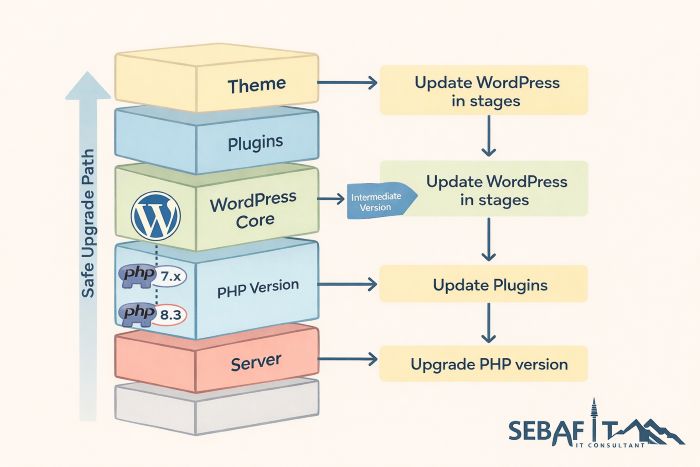
You cannot safely upgrade all three at once if the system is several years behind. Doing so would almost certainly break the site.
The goal was therefore not speed, but control. Upgrade step by step, always keeping the site functional.
Why this matters for clients
Most site owners do not care about PHP versions or plugin compatibility. They just want their website to work, to be secure and to not generate unnecessary costs.
In many cases, people keep paying for outdated support plans simply because no one ever reassessed the setup. Not because it is needed, but because “it has always been like that”.
My job is not to sell complexity.
My job is to remove it. If a system can be modernized safely, it should be. If a rebuild is truly required, I will say so.
Trust only works if both options are on the table.
The way forward (How to…)
For WordPress admins who want the technical path:
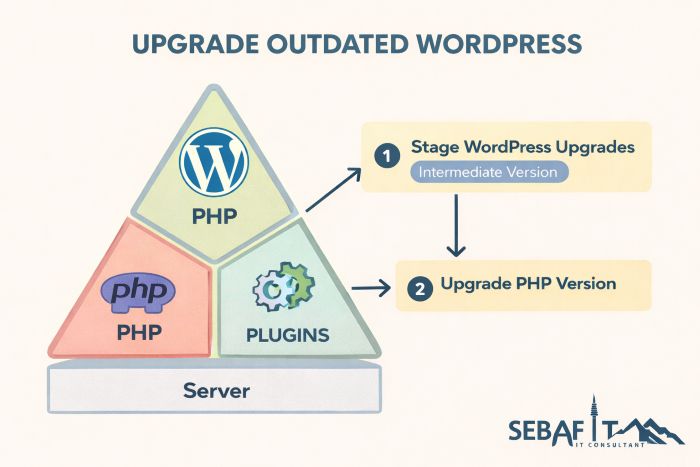
The key principle is staged upgrading.
- First, take a full backup of files and database. This is non-negotiable.
- Second, upgrade WordPress core to an intermediate stable version that still supports the old PHP version. Do not jump straight to the latest release.
- Third, update critical plugins only. Avoid optional or cosmetic plugins at this stage.
- Fourth, once WordPress and plugins are compatible, upgrade PHP to the next major supported version. Test thoroughly.
- Fifth, repeat the process until you reach the current WordPress and PHP versions.
- In multisite environments, always validate network-wide settings and roles after each step.
This process takes more attention than a rebuild, but far less time and money overall.
The result

…speaks for itself.
The site now runs on WordPress 6.9, PHP 8.3 and fully updated plugins.
No rebuild. No data loss. No redesign.
And no more pointless “extended support” fees.
The client saved, in addition to the monthly 20 € ransom fee, well over 3,000 € compared to a full rebuild. That outcome matters more to me than selling more hours.
Why I work this way
Many professionals would not touch a setup like this. From a business perspective, a rebuild is easier to sell and easier to scope.
I prefer to solve the actual problem.
In this case, the client did not need a new website. He needed clarity, technical honesty and a clean upgrade path.
Long-term relationships are built exactly here.
Not by maximizing invoices, but by making decisions that still feel right years later.